
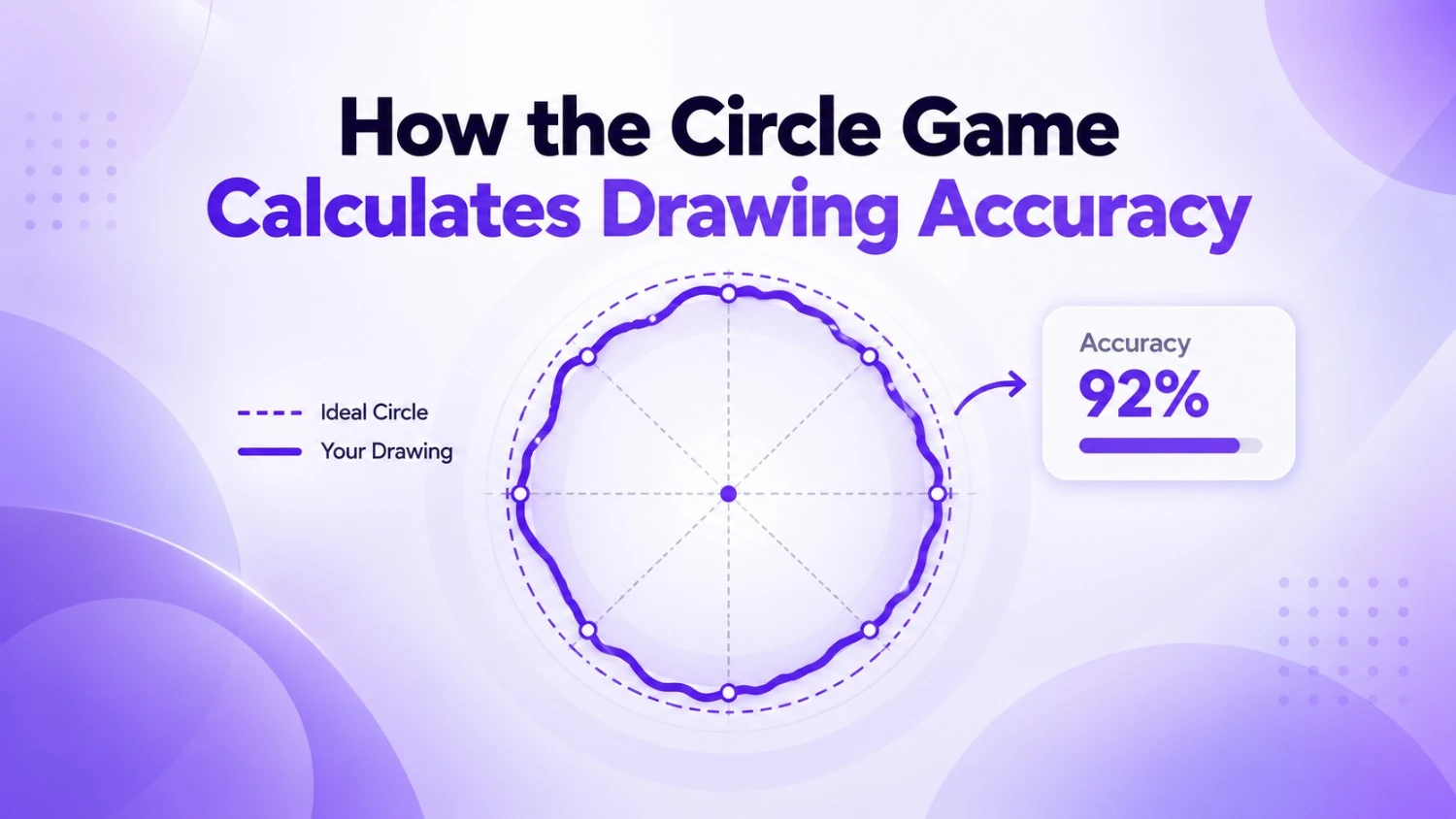
How WebRiseHub scores your drawing
In WebRiseHub’s Circle Game, the overall result combines shape similarity (60%), size accuracy (15%), position accuracy (10%) and outline similarity (15%). The game compares your drawing with the selected reference shape and rounds the combined result to a percentage. Select Finish Drawing to see your result; drawing time does not change the score.
The geometry sections below explain general ideas used in circle-drawing challenges. WebRiseHub compares rasterized drawings rather than fitting an ideal circle and separately scoring radius consistency, closure and angular coverage. You can also draw other reference shapes, and use Undo, Redo or additional strokes before finishing.
How Does a Circle Game Know How Accurate Your Drawing Is?
Drawing a perfect circle sounds easy until you actually try it. Start the Circle Game, draw one continuous loop with your mouse, finger, or trackpad, and a shape that looked nearly perfect while you were drawing it can suddenly receive a much lower accuracy score than expected.
That raises an obvious question: how does a Circle Game calculate drawing accuracy?
The answer comes down to geometry. Your drawing can be treated as a collection of points. The game can compare those points with the mathematical properties of an ideal circle and measure how consistently your stroke follows a circular path.
Small changes in radius, sudden hand movements, incomplete curves, and gaps between the beginning and end of the stroke can all make a circle look less mathematically consistent.
In this guide, we will break down the ideas behind Circle Game scoring and explain why some circles receive much higher scores than others.
What Is the Circle Game?
The Circle Game, sometimes called a perfect circle game or draw-a-perfect-circle challenge, is a simple browser game that tests how accurately you can draw a circle freehand.
Instead of using a compass or shape tool, you create the circle yourself using a mouse, trackpad, stylus, or touchscreen.
Once the stroke is complete, the game analyzes the shape and returns an accuracy score. The closer your drawing behaves like a mathematically consistent circle, the better the score.
- Draw the circle in one smooth motion.
- Try to maintain a consistent distance from the center.
- Avoid sudden corrections while drawing.
- Complete the full loop.
- Try to finish close to where you started.
What Makes a Circle Mathematically Perfect?
A perfect circle has one important property: every point on its edge is exactly the same distance from its center.
That distance is called the radius.
Imagine placing a dot in the center of your drawing and measuring the distance from that dot to hundreds of positions around your circle. In a mathematically perfect circle, every measurement would be identical.
Human-drawn circles are different. The radius usually becomes slightly larger or smaller as your hand moves around the shape.
Those variations are one of the main things a circle accuracy system can measure.
Step 1: The Game Records Your Drawing as Points
When you drag your mouse or finger across the drawing area, the browser does not see your circle in the same way you do.
Instead, it records a sequence of positions along your stroke.
Each position can be represented using X and Y coordinates. Together, those coordinates create a digital representation of the path your hand followed.
A smoother circle produces points that follow a consistent curved path. A shaky or uneven circle produces greater variation between those points.
Step 2: Estimating the Center of Your Circle
To evaluate the shape, the game first needs a useful reference point for the circle.
A drawing algorithm can estimate the center of the stroke using the recorded coordinates or fit an ideal circle to the path that was drawn.
This matters because judging a circle is not simply about whether it appears in exactly the right place on the screen. The shape itself needs to be circular.
Once an estimated center has been established, the game can measure how far different parts of your drawing are from that point.
Step 3: Measuring Radius Consistency
Radius consistency is one of the most useful ways to judge how circular a freehand drawing is.
The game can measure the distance between the estimated center and many of the points collected from your stroke.
If those distances stay relatively consistent, the drawing behaves like a circle.
If the distance changes significantly, the drawing may be stretched, flattened, wobbly, or irregular.
For example, imagine most of your circle has a radius of about 120 pixels, but one section expands to 140 pixels. That section creates a noticeable deviation from the expected circular path.
- Smaller radius variation usually means a rounder circle.
- Large outward bumps can reduce accuracy.
- Sections drawn too close to the center can also reduce accuracy.
- Smooth movements generally produce more consistent measurements.
Step 4: Measuring How Far Your Stroke Deviates From an Ideal Circle
After estimating what an ideal circle for your drawing would look like, the game can compare your actual stroke with that ideal shape.
For every sampled point, the algorithm can calculate how far the point sits from the expected circular path.
Small differences mean your stroke closely follows the ideal circle. Larger differences indicate that part of the drawing moved away from the ideal curve.
The combined deviation across the entire stroke can then be used as part of the accuracy calculation.
This is why a circle with one very obvious bump can sometimes score worse than a slightly imperfect circle that stays consistently round.
Step 5: Checking Whether the Circle Is Properly Closed
Roundness is not the only characteristic of a good circle. A circle should also form a complete loop.
If the end of your stroke stops far away from where the drawing began, the shape may contain a visible gap.
A scoring system can measure the distance between the starting point and ending point of your stroke to determine how well the loop was completed.
Finishing close to your starting position usually produces a cleaner and more complete circle.
Step 6: Checking the Full Circular Path
A high-quality circle should travel around the entire shape instead of covering only part of the expected loop.
The game can examine how much of the circular path your stroke covers.
A nearly perfect arc that only covers three quarters of a circle should not necessarily receive the same score as a complete closed circle.
This helps distinguish between simply drawing a smooth curve and actually drawing a complete circle.
How the Circle Accuracy Score Is Produced
Once the drawing has been analyzed, the game can combine measurements such as radius consistency, deviation from the ideal curve, stroke completeness, and closure into an overall accuracy value.
The final result is usually converted into an easy-to-understand percentage.
A score closer to 100% means your drawing behaved more like an ideal circle according to the measurements used by the game.
The important thing to understand is that the percentage does not simply ask whether your drawing looks good to the human eye. It evaluates measurable geometric consistency.
Why Does My Circle Look Perfect but Get a Lower Score?
Human vision is surprisingly forgiving. We can look at a slightly stretched or uneven shape and immediately recognize it as a circle.
A mathematical scoring system is less forgiving.
Tiny changes in radius that are difficult to notice visually can become obvious once hundreds of points along the stroke are measured.
You may also make small corrections while drawing. Those corrections can create bumps that are barely visible at normal size but still affect geometric consistency.
That is why a circle that appears excellent can still fall short of a near-perfect accuracy score.
Does a Mouse, Trackpad, or Touchscreen Change Your Score?
Your input method can influence how easy it feels to draw a smooth circle.
A mouse gives you precise cursor control, but drawing large curved movements with your wrist can be difficult.
A trackpad requires smaller finger movements and may introduce additional wobble.
On a touchscreen, drawing with your finger can feel more natural because the movement resembles drawing on paper. However, your finger can also cover part of the line while you draw.
A stylus may provide the most pen-like experience, but the best method ultimately depends on what feels natural to you.
How to Get a Higher Score in the Circle Game
Improving your perfect circle score is usually less about drawing slowly and more about maintaining one smooth, confident movement.
Constantly stopping to correct the line can introduce additional changes in radius.
- Draw with one continuous movement instead of repeatedly correcting your path.
- Use your whole arm for larger circles instead of relying only on your wrist.
- Keep your drawing speed relatively consistent.
- Look slightly ahead of your cursor rather than staring directly at it.
- Try to maintain the same distance from the center throughout the stroke.
- Avoid making the circle extremely small because tiny movements become more significant.
- Finish the loop close to your starting position.
- Practice several attempts using the same device before comparing scores.
Why Is Drawing a Perfect Circle So Hard?
Humans are extremely good at recognizing circles but surprisingly bad at drawing mathematically perfect ones without assistance.
Your wrist, elbow, and shoulder all rotate around different joints. Combining those movements into one path with an absolutely constant radius requires extremely precise coordination.
Even a tiny change in pressure, speed, direction, or wrist angle can alter the curve.
That difficulty is exactly what makes the perfect circle challenge entertaining. The concept takes seconds to understand, but getting closer to 100% can require dozens of attempts.
What Is a Good Circle Game Score?
There is no universal definition of a good score because different Circle Games may use different scoring formulas.
Instead of comparing your percentage with a score from another website, compare attempts within the same game.
Your personal best is usually the most meaningful benchmark.
If you begin at 70% and eventually reach 85% or 90%, that improvement shows that your drawing has become more geometrically consistent according to the same scoring system.
Can You Actually Get 100% on the Perfect Circle Game?
A true 100% score represents an extremely accurate circle according to the game's scoring tolerance.
Whether a human-drawn circle can receive exactly 100% depends on how the individual game rounds scores and how strict its algorithm is.
You do not need a literal mathematically perfect circle to enjoy the challenge. The fun comes from improving your score and seeing how close you can get.
Circle Game Accuracy FAQ
How does the Circle Game calculate accuracy? The game analyzes points recorded along your drawing and compares the resulting shape with the geometric properties expected from a circle.
What affects a perfect circle score? Radius consistency, smoothness, deviation from an ideal circular path, how complete the stroke is, and how closely the beginning and end connect can all influence a circle accuracy system.
Why does a shaky circle get a lower score? Shaking creates greater variation in the position of points along the stroke, making the radius less consistent.
Is drawing slowly better? Not necessarily. Drawing too slowly may encourage frequent corrections. A controlled, consistent movement often creates a smoother curve.
Can I play the Circle Game on mobile? If your game supports touch input, you can usually draw using your finger or stylus directly on the screen.
Does circle size matter? Extremely small circles can be harder to control because every small movement represents a larger percentage of the overall shape.
Is 100% possible? It depends on the scoring algorithm and rounding method used by the specific Circle Game.
Try the Circle Game and Test Your Accuracy
The Circle Game turns a simple drawing challenge into a small geometry experiment.
Behind every score is a comparison between the path you drew and the characteristics of an ideal circle: consistent radius, a smooth curve, full coverage, and a properly completed loop.
The next time your circle looks perfect but the score disagrees, look closely at the shape. You may notice a small bump, a stretched section, or a gap that was almost invisible while you were drawing.
Now that you know what the game is looking for, try another round and see if you can beat your previous score.
Have a correction or a question? Contact WebRiseHub.